
Target strength for a calibration sphere
Source:vignettes/calibration/calibration-implementation.Rmd
calibration-implementation.RmdacousticTS implementation
SOEMS evaluates solid elastic reference spheres used in standard-target calibration (Dragonette et al. 1981; Foote 1990; MacLennan 1981).
Create a CAL object, evaluate it with
target_strength(), and inspect the stored spectrum. The
object retains the sphere dimensions and elastic material properties
alongside the result.
Calibration sphere object generation
A calibration sphere is created with cal_generate().
diameter is supplied in metres. material
selects a stored preset, or the density and longitudinal and transverse
sound speeds can be supplied directly.
See cal_generate()
for the current preset names and values. Keeping that list on the
function reference page avoids a second copy that can drift from the
package definitions.
When using the defaults:
library(acousticTS)

cal_sphere <- cal_generate()
# equivalent to: cal_generate(material = "WC", diameter = 38.1e-3)
Calculating a target-strength spectrum
target_strength() returns an updated object. The
registered model name is "calibration".
"SOEMS" is its public alias.
frequency <- seq(1e3, 600e3, 1e3)

cal_sphere <- target_strength(
  object = cal_sphere,
  frequency = frequency,
  model = "calibration"
)
Inspecting model results
Plot the stored spectrum for a quick check or use
extract() for downstream analysis.
Plotting results
The plot() method can be used to display either the
sphere geometry or the modeled output. For calibration work, the most
common use is type = "model", which plots the stored
target-strength spectrum. The optional x_units argument can
also be used to display the horizontal axis in terms of frequency or in
terms of radius-scaled wavenumber.
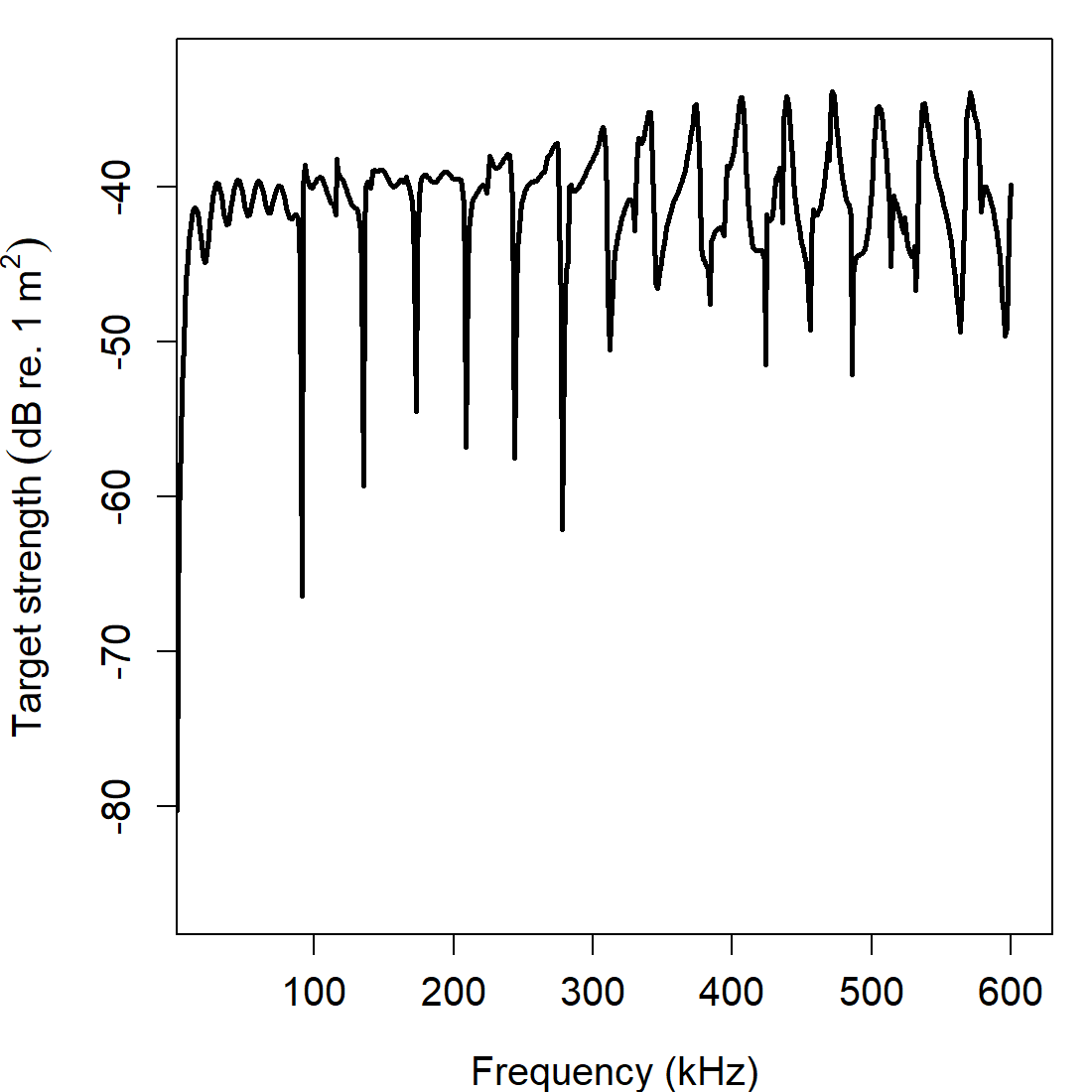
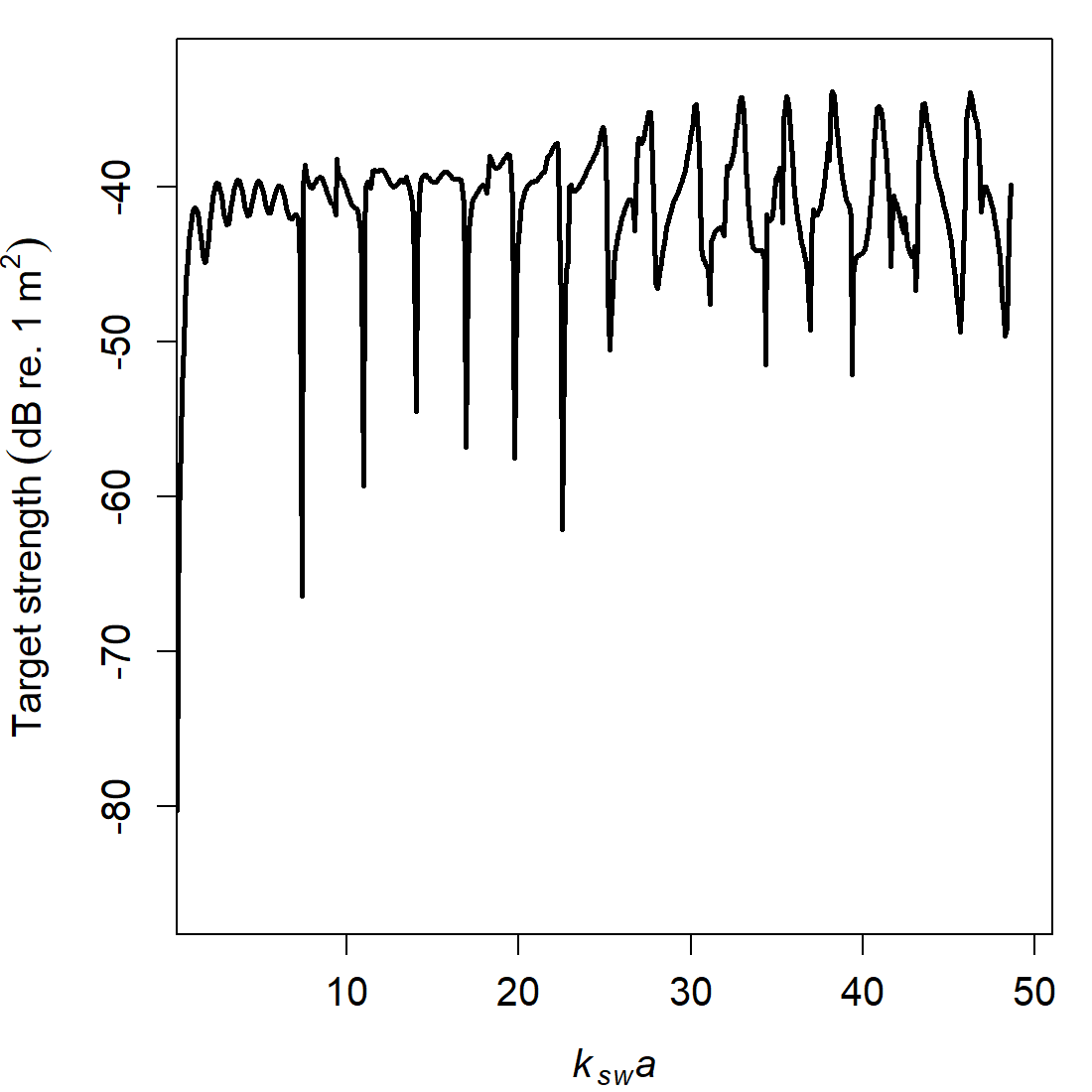
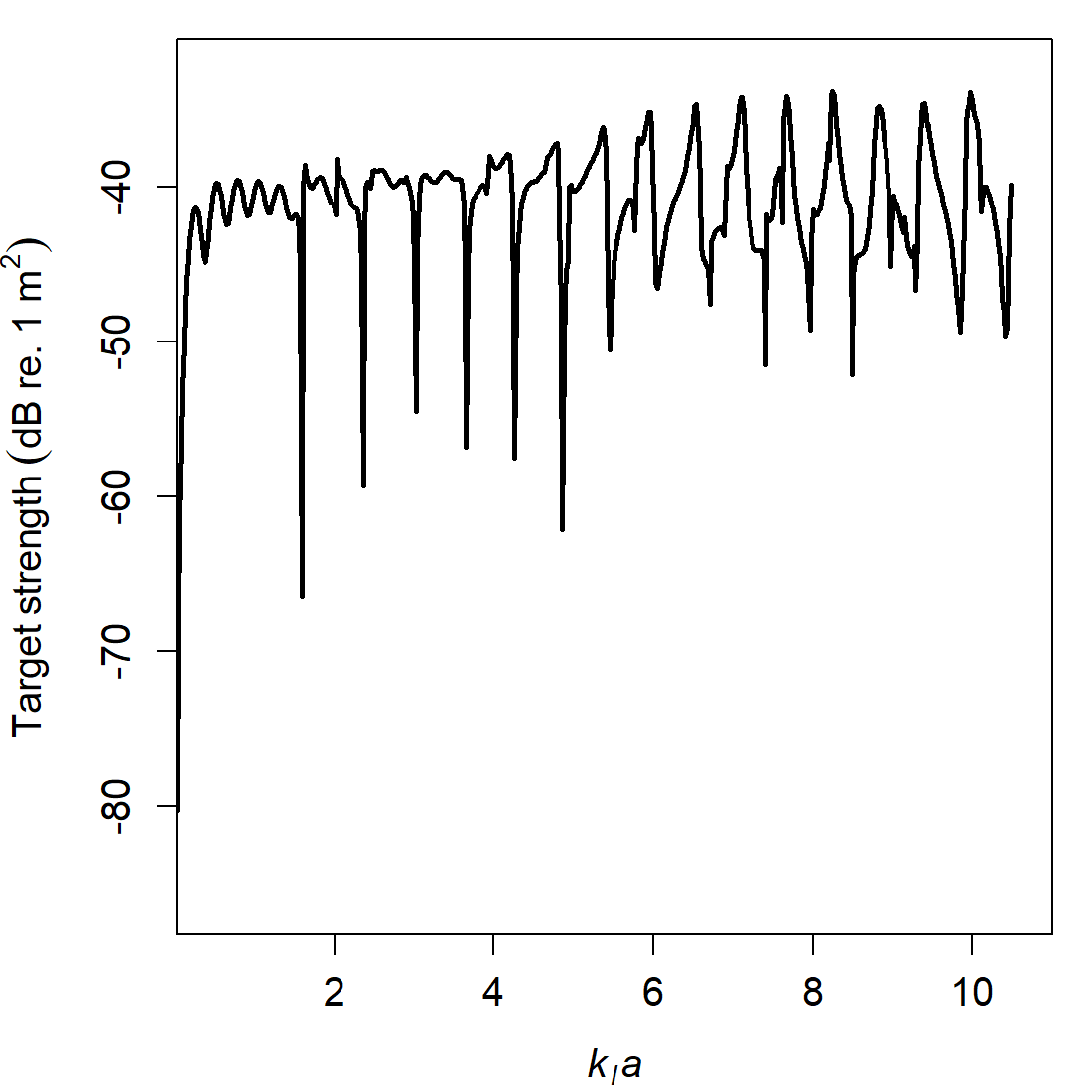
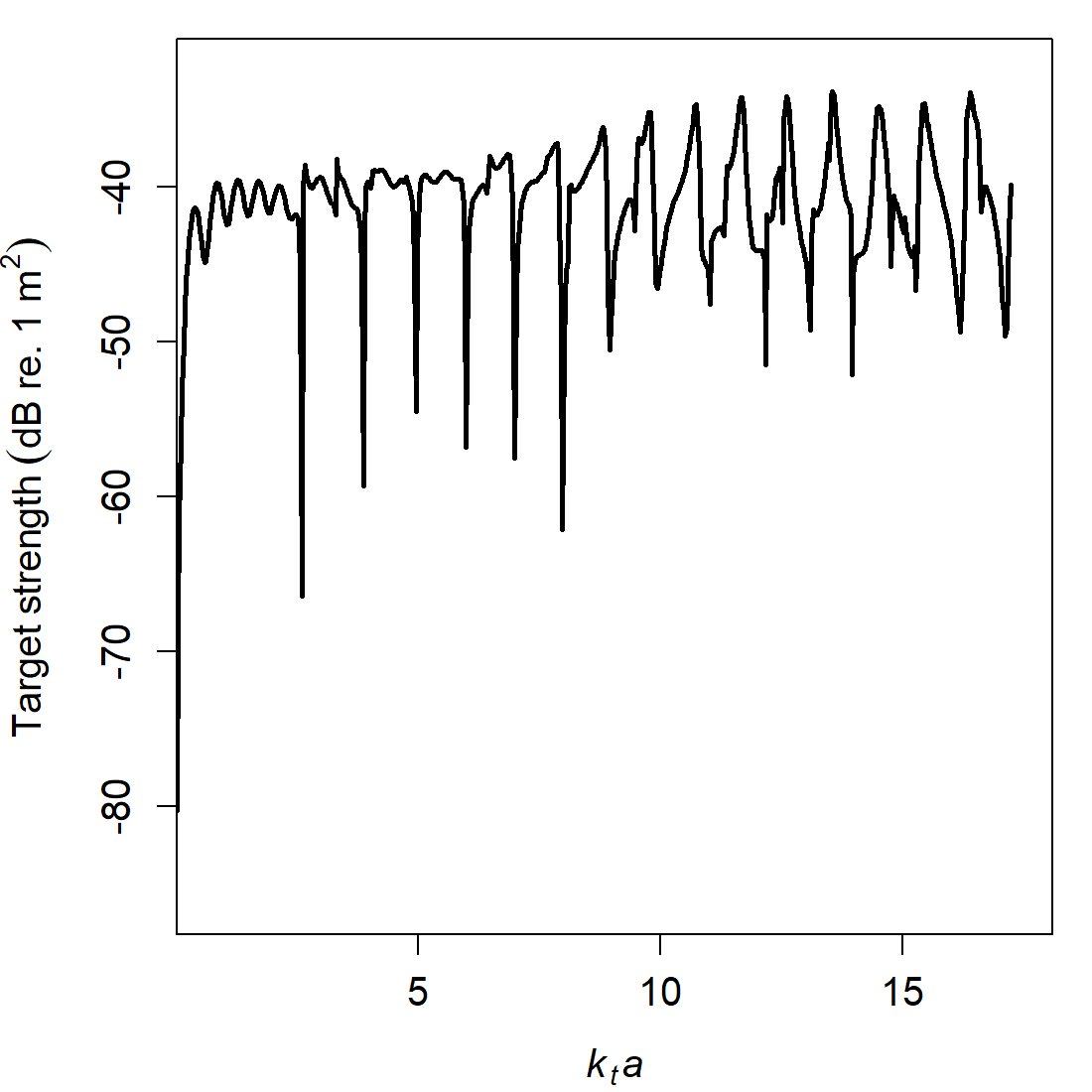
Those alternatives are useful for different reasons. Frequency is the natural axis for practical calibration work, while the radius-scaled wavenumber views are useful when comparing spheres of different diameters or different materials on a common nondimensional scale.
Accessing results
The model results can also be accessed directly with
extract(). For the calibration workflow,
feature = "model" returns a data frame containing the
stored spectral outputs.
##   frequency        ka         f_bs     sigma_bs        TS
## 1      1000 0.0810226 9.735761e-05 9.478503e-09 -80.23260
## 2      2000 0.1620452 3.853270e-04 1.484769e-07 -68.28341
## 3      3000 0.2430678 8.518051e-04 7.255720e-07 -61.39319
## 4      4000 0.3240904 1.477241e-03 2.182242e-06 -56.61097
## 5      5000 0.4051130 2.235373e-03 4.996892e-06 -53.01300
## 6      6000 0.4861356 3.093986e-03 9.572752e-06 -50.18963
The extracted data frame includes the working frequency grid, the
ambient acoustic-size variable ka, the reported
backscattering length f_bs, the backscattering
cross-section sigma_bs, and target strength
TS. In the current calibration workflow, these quantities
are related by:
\sigma_{\mathrm{bs}} = |f_{\mathrm{bs}}|^2, \qquad \mathit{TS} = 10 \log_{10}\left(\sigma_{\mathrm{bs}}\right).
Calibration references do not always use the same amplitude normalization. See the Theory page for the normalization used by SOEMS.
Comparison workflows
Diameter and material comparisons isolate geometric scaling from elastic material effects.
Diameter comparisons
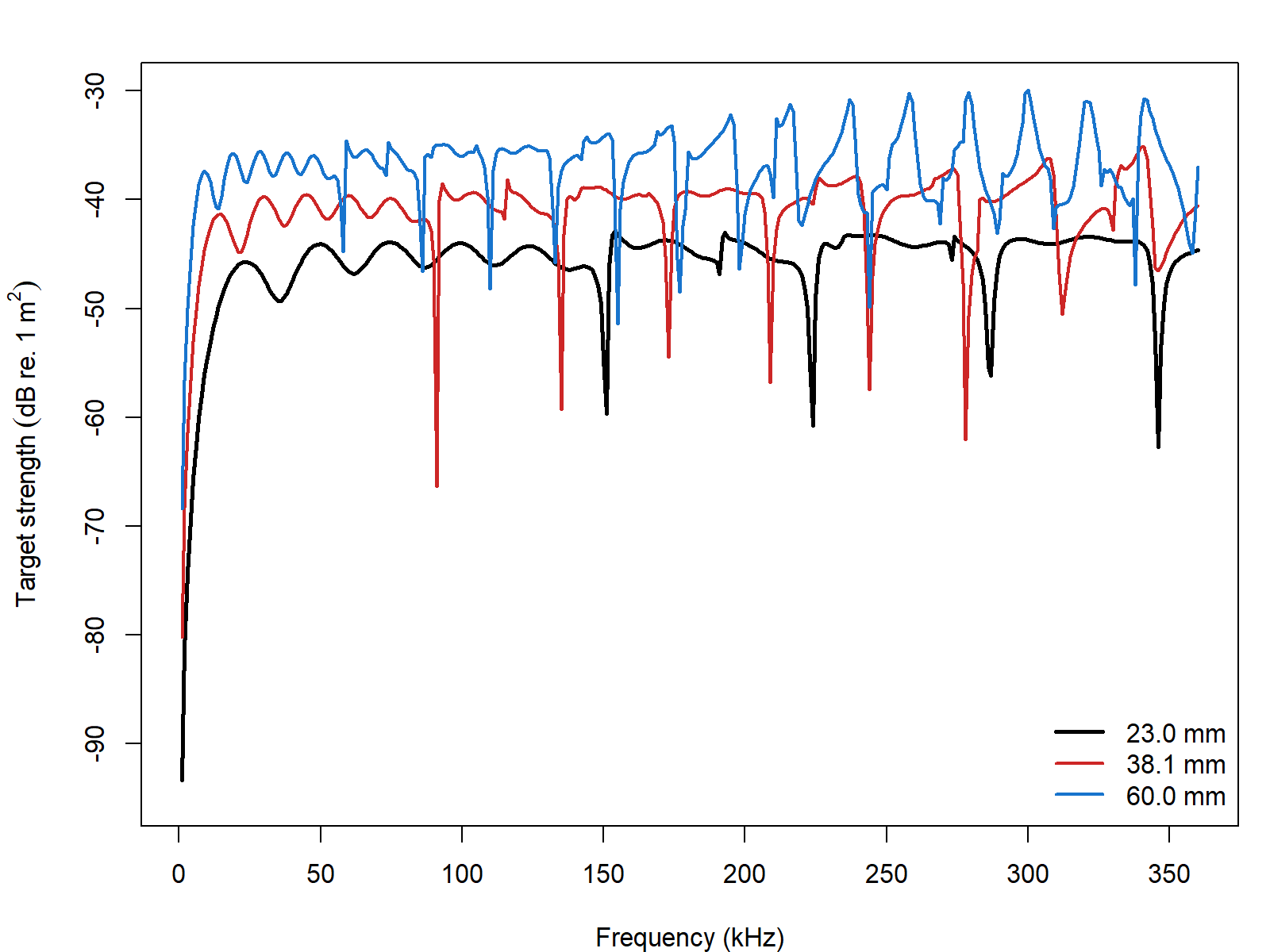
Diameter changes alter the acoustic-size scaling directly, so the resonance structure shifts across the frequency axis even when the sphere material is unchanged. That is one reason calibration practice is usually tied to standard diameters rather than to an abstract material class alone.
Material comparisons
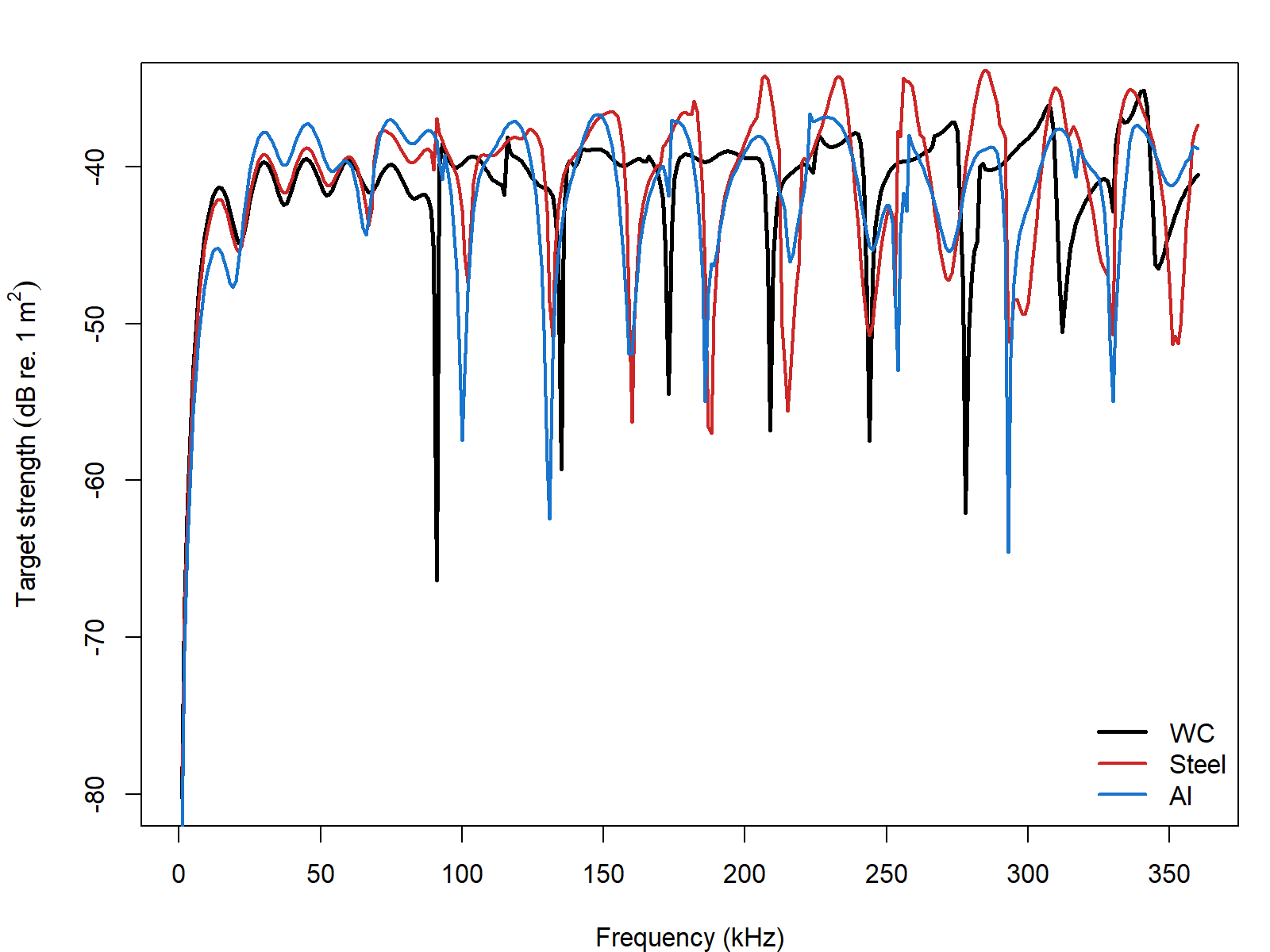
Material comparisons are especially informative because they isolate the role of elastic wave speeds and density from the purely geometric role of sphere size. A tungsten carbide sphere and an aluminum sphere of the same diameter do not simply differ by a vertical offset. Their resonance structure can also shift because the interior compressional and shear wave speeds have changed.
External implementation comparison
The external check compares the MacLennan elastic-sphere formulation
with SphereTS, echoSMs, and the NWFSC calibration applet (MacLennan 1981; Macaulay 2025; Macaulay and
contributors 2024). With adaptive = TRUE
(the default), the solver starts at \operatorname{round}(ka)+10 partial waves and
extends the sum until its tail falls below 10^{-10}. adaptive = FALSE uses
only the initial fixed cutoff. The 38.1 mm tungsten-carbide comparison
is limited to 1–360 kHz so the applet remains within its stated ka \lesssim 30 range.
| Comparison | N frequency | Max abs. \Delta TS (dB) | Mean abs. \Delta TS (dB) |
|---|---|---|---|
| acousticTS vs echoSMs | 360 | 0 | 0 |
| acousticTS vs sphereTS | 360 | 0 | 0 |
| acousticTS vs NOAA applet | 360 | 0 | 0 |
| echoSMs vs sphereTS | 360 | 0 | 0 |
| echoSMs vs NOAA applet | 360 | 0 | 0 |
| sphereTS vs NOAA applet | 360 | 0 | 0 |
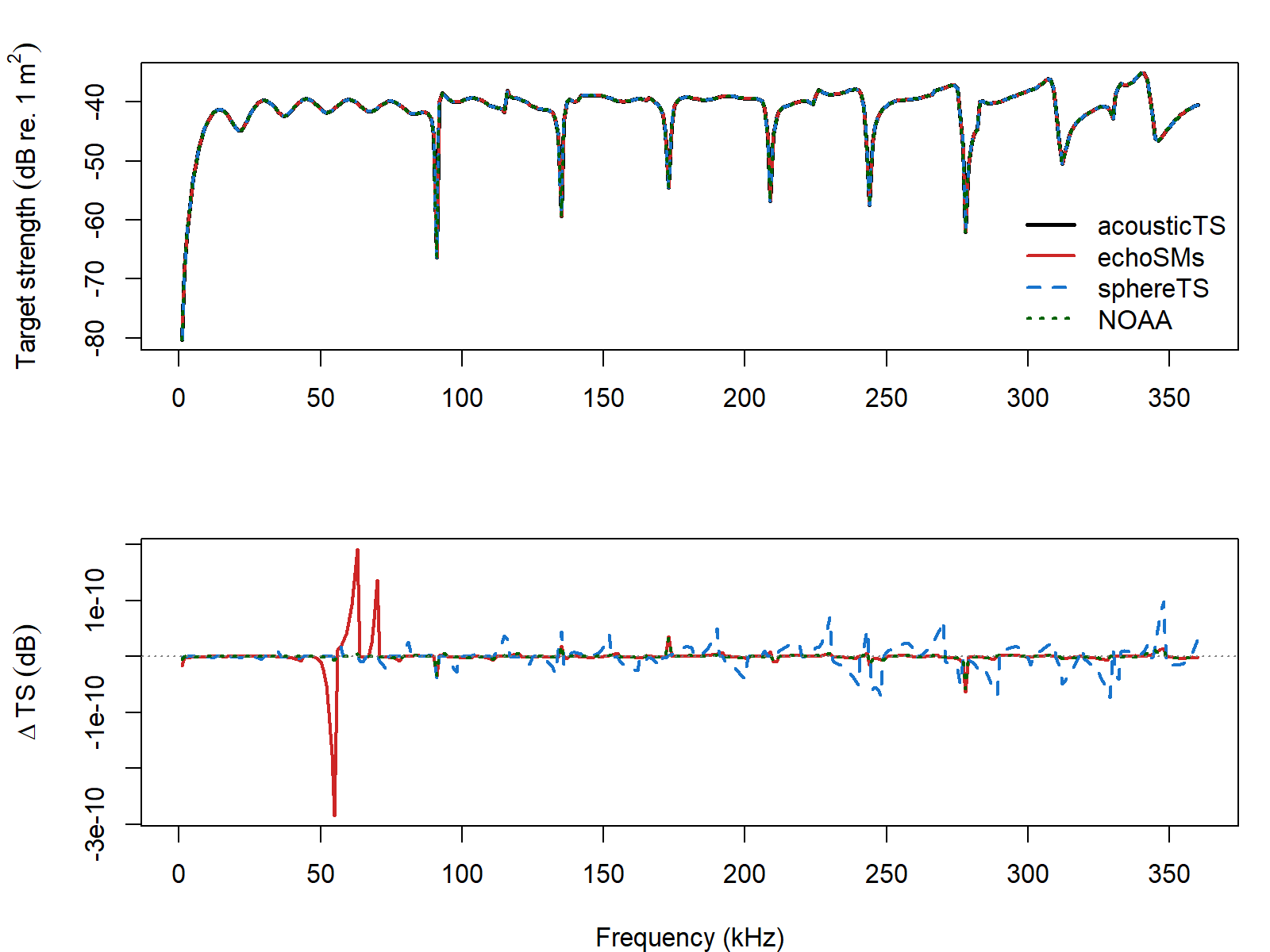
For the 38.1 mm tungsten-carbide sphere, adaptive = TRUE
agrees with the other implementations to about 10^{-10} dB. The fixed cutoff remains close,
with a maximum difference of about 7.2 \times
10^{-5} dB.
To show that this is not unique to the 38.1 mm tungsten-carbide
sphere, the same comparison was repeated for one smaller
tungsten-carbide sphere and one copper sphere from the
calibration-target definitions shipped with echoSMs (Macaulay and contributors 2024), again
including the SphereTS implementation (Macaulay
2025).
| Target | Diameter (mm) | N frequency | Max frequency (kHz) | Max abs. \Delta adapt = TRUE vs echoSMs (dB) | Max abs. \Delta adapt = FALSE vs echoSMs (dB) | Max abs. \Delta adapt = TRUE vs sphereTS (dB) | Max abs. \Delta adapt = FALSE vs sphereTS (dB) | Max abs. \Delta adapt = TRUE vs NOAA applet (dB) | Max abs. \Delta adapt = FALSE vs NOAA applet (dB) |
|---|---|---|---|---|---|---|---|---|---|
| WC20 calibration sphere | 20.0 | 360 | 360 | 0 | 1.0e-06 | 0 | 1.0e-06 | 0 | 1.0e-06 |
| WC38.1 calibration sphere | 38.1 | 360 | 360 | 0 | 7.2e-05 | 0 | 7.2e-05 | 0 | 7.2e-05 |
| Cu32.1 calibration sphere | 32.1 | 360 | 360 | 0 | 4.5e-05 | 0 | 4.5e-05 | 0 | 4.5e-05 |
Across the additional targets, the adaptive solver keeps the maximum absolute differences near 10^{-10} dB. The fixed cutoff remains within about 10^{-5} to 10^{-4} dB of the other implementations.