
Why the package separates these layers
acousticTS separates a target’s geometry, physical
interpretation, and scattering model. These layers are related, but they
answer different questions:
- A shape defines what the target looks like.
- A scatterer defines what the target represents physically.
- A model calculates an acoustic response from that representation.
Keeping these concerns separate is the central package design choice. It lets geometry be checked before material assumptions are introduced. It also lets a physical target be reused across compatible models without reconstructing it for every calculation.
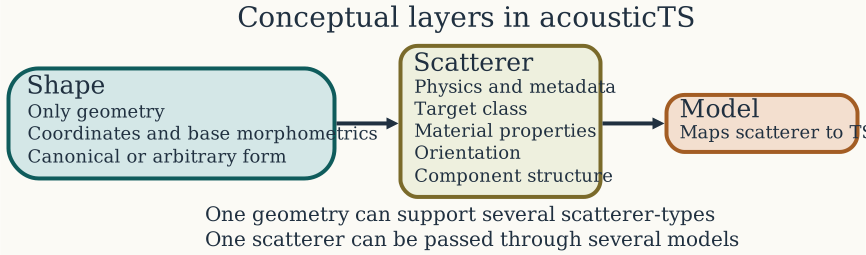
Select Shape, Scatterer, or Model in the figure to open the corresponding practical guide.
Why the package uses S4 objects
Shapes and scatterers are represented as S4 objects. S4 gives each class a declared structure, supports inheritance from broader parent classes, and lets generic functions behave according to the type of object they receive. These features are useful for acoustic targets because related objects share some information while requiring different geometry or physical components.
The base Shape class
declares slots for a position matrix and shape parameters. Its
subclasses provide the structure for canonical and arbitrary geometries.
The base Scatterer
class declares common metadata and model parameters. Its subclasses
add the components needed for particular physical targets. For example,
a scatterer may require a body alone, a body and bladder, or a shell and
enclosed fluid.
This formal structure prevents the meaning of an object from depending only on the names in an unrestricted list. It also lets shared operations such as display, plotting, and extraction work across related classes. Constructors are the usual way to create these objects because they assemble and check the required slots.
Three distinct layers
Shape: geometry
A Shape
object contains geometry and associated morphometrics. It may
describe a canonical form, such as a sphere or cylinder, or an arbitrary
body represented by coordinates. It does not assign material properties,
a boundary condition, or biological meaning.
This narrow responsibility makes shapes reusable. The same spherical geometry, for example, can participate in target descriptions with very different materials and boundary behavior. Conversely, the same physical class can use different supported geometries. Geometry therefore remains an input to the physical description rather than serving as a proxy for it.
Scatterer: physical target
A Scatterer
object combines geometry with its acoustic interpretation. Its class
expresses what kind of target is being represented and what components
it must contain. A fluid-like body, a gas-bearing target, a shell
surrounding a fluid, and a calibration sphere do not require the same
information, even when their outer geometries are similar.
The class structure makes those differences explicit. Depending on
the target, a scatterer may contain a body,
bladder, shell, or fluid
component. It also carries metadata, orientation, geometric parameters,
and the material quantities required by compatible models. The class is
therefore part of the scientific definition of the target, not just a
programming label.
Model: acoustic calculation
A model maps a compatible scatterer and a set of acoustic conditions to a predicted response. It does not redefine the target. This distinction matters because several models may be defensible for the same physical object, while making different approximations or covering different regimes.
Each model family has two stages inside the package. An initializer
translates the common scatterer representation into the parameters
needed by that model. A solver then evaluates the calculation and stores
its output. This shared structure allows target_strength()
to provide one interface while preserving the differences among model
formulations.
Design philosophy
Reusing shapes and scatterers
The package is designed around two forms of reuse shown in the architecture figure. One geometry can support several physical interpretations, and one physical target can be evaluated with several compatible models. Neither form of reuse implies that the alternatives are physically interchangeable.
This separation is especially useful for model comparison. Holding the target definition fixed reduces the chance that an apparent model difference was actually caused by a changed geometry, orientation, or material value. It also supports parameter studies in which only one layer should vary.
Keeping assumptions explicit
Important assumptions should be represented in the object or model call rather than inferred from an ambiguous collection of values. Scatterer classes expose component structure. Model initializers establish model-specific parameters. Compatibility checks can then reject combinations that the implementation does not support.
The same principle applies to units and orientation conventions. Package interfaces use a shared internal representation so that downstream models do not each invent their own interpretation. The relevant conventions and symbols are collected in Notation and Symbols.
Different models serve different purposes
acousticTS does not treat the presence of a model as
evidence that it is the best choice for every supported target. Exact
series solutions, approximations, composite models, and numerical
methods answer different questions and have different domains of
validity. The package provides a shared target representation so those
alternatives can be applied and compared deliberately.
The package tracks model registration and model validation separately. The model registry connects each model name to its initializer, solver, and stored result. A separate validation registry records benchmark and validation status. A model being available does not mean that it has been validated across every parameter regime. See Choosing a Model and Validation and Benchmarks before relying on a model outside its documented scope.
Keeping results with their inputs
target_strength()
returns the scatterer with the requested model parameterizations and
outputs attached. The returned object still carries the target geometry,
physical components, and metadata used in the calculation. Multiple
model results can therefore remain associated with a common target
definition.
This is local traceability, not a substitute for a complete
reproducibility record. Code, package versions, input data, and
computational settings still need to be recorded by the surrounding
analysis. Within a workflow, however, keeping inputs and outputs on the
same scientific object makes results easier to inspect with common
interfaces such as extract() and plot().
Adding new models
The package is not limited to its built-in models. A new model can be
registered with register_model()
by supplying an initializer, a solver, and a result name. It then uses
the same shape–scatterer–model organization as the built-in methods
without requiring changes to the package source. The steps are described
in Creating
Models from Scratch.
Object lifecycle
A typical object moves through four states:
- A shape records geometry.
- A scatterer constructor assigns physical meaning and component structure.
- A model initializer derives the model-specific parameterization.
- A solver returns the scatterer with calculated results attached.
These states suggest a useful order for diagnosing unexpected results. Inspect the geometry first, then the scatterer class and physical inputs, followed by model compatibility and numerical settings. Interpretation comes last, after the preceding layers have been verified.