
Creating Models
Source:vignettes/creating-models-from-scratch/creating-models-from-scratch.Rmd
creating-models-from-scratch.RmdThe model interface
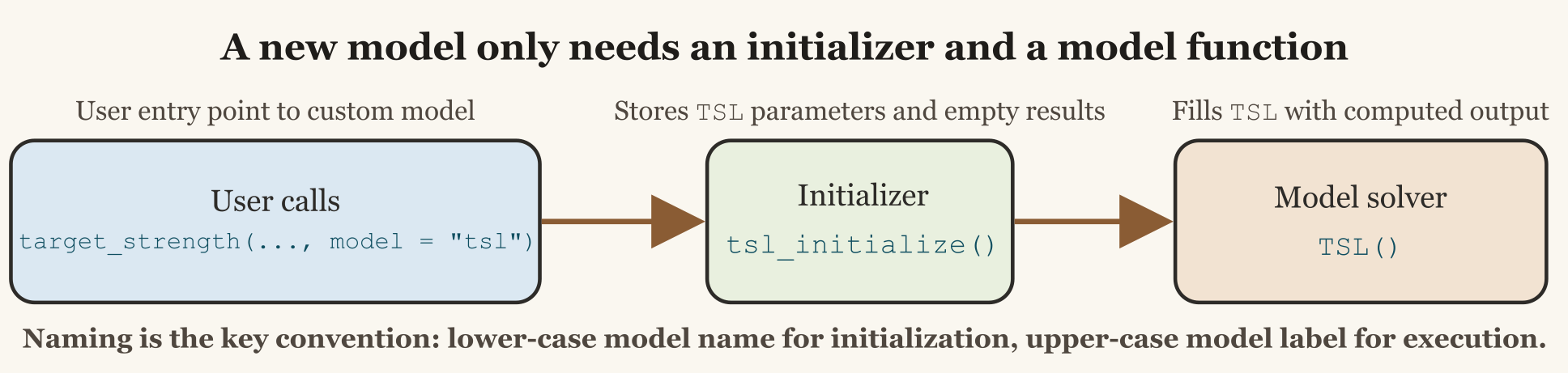
An acousticTS model has two callable parts:
- an initializer that checks user input and prepares the scatterer, and
- a solver that performs the calculation and stores its output.
The model registry maps a public name to those functions and to the
name used in the object’s model_parameters and
model slots. Function names are not part of that contract.
Names such as tsl_initialize() and TSL() are
useful source conventions, but the registry also accepts differently
named functions or package-qualified character references.
Use register_model()
to add a model for the current R session:
register_model(
  name = "tsl",
  initialize = tsl_initialize,
  solver = TSL,
  slot = "TSL",
  aliases = "toy_tsl"
)
After registration, both model = "tsl" and
model = "toy_tsl" use the same implementation. available_models()
shows the resolved name, slot, aliases, and source.
Initializer contract
The initializer is called with object,
frequency, and model-specific arguments forwarded by target_strength().
It must return the updated Scatterer. Its usual
responsibilities are:
- reject unsupported scatterer classes, boundaries, or parameter values,
- derive the geometry and material quantities needed by the solver,
- store those values in
model_parameters[[slot]], and - prepare
model[[slot]]with one row per requested output condition.
Keep numerical work in the solver unless the calculation is
specifically part of input preparation. This separation makes
initialization errors distinct from solver failures and gives simulate_ts() a
consistent interface.
A minimal empirical example
The following toy model predicts target strength from body length. It is only an interface example, not a physical scattering model. Define its relationship as:
TS = a + b\log_{10}(L_{\mathrm{mm}}),
where a is the intercept, b is the slope, and L_{\mathrm{mm}} is body length in millimeters.
Prepare the object
The initializer extracts the stored length, validates it, and allocates the result table:
tsl_initialize <- function(object,
                           frequency,
                           intercept = -70,
                           slope = 20) {
  shape <- acousticTS::extract(object, "shape_parameters")
  length_m <- shape$length

  if (length(length_m) != 1L || !is.finite(length_m) || length_m <= 0) {
    stop("TSL requires one positive, finite body length.", call. = FALSE)
  }

  methods::slot(object, "model_parameters")$TSL <- list(
    parameters = data.frame(frequency = frequency),
    body = data.frame(length_m = length_m),
    coefficients = data.frame(intercept = intercept, slope = slope)
  )

  methods::slot(object, "model")$TSL <- data.frame(
    frequency = frequency,
    sigma_bs = rep(NA_real_, length(frequency)),
    TS = rep(NA_real_, length(frequency))
  )

  object
}
Production initializers should also check that frequency
is finite and positive, that coefficient lengths are compatible with the
output grid, and that the scatterer class represents the target for
which the model was derived.
Fill the result slot
The solver reads only the prepared state, calculates the result, and returns the updated object:
TSL <- function(object) {
  inputs <- acousticTS::extract(object, "model_parameters")$TSL

  length_mm <- inputs$body$length_m * 1e3
  TS <- inputs$coefficients$intercept +
    inputs$coefficients$slope * log10(length_mm)
  sigma_bs <- acousticTS::linear(TS)

  n <- nrow(inputs$parameters)
  methods::slot(object, "model")$TSL <- data.frame(
    frequency = inputs$parameters$frequency,
    sigma_bs = rep(sigma_bs, n),
    TS = rep(TS, n)
  )

  object
}
This empirical equation determines TS and
sigma_bs, but not the phase of a complex scattering
amplitude. It therefore does not report f_bs. Do not use
sqrt(sigma_bs) as though it were a phase-resolved
amplitude. That assignment would silently impose zero phase and could
make a later coherent component sum look valid when it is not.
The registered model can now use the standard entry point:
target <- target_strength(
  object = target,
  frequency = c(38e3, 70e3, 120e3),
  model = "tsl",
  intercept = -68,
  slope = 19.5
)

extract(target, "model")$TSL
The repeated value across frequency is intentional in this toy equation. A frequency-dependent solver must instead return values aligned with the input frequency grid.
Session and persistent registration
Passing function objects to register_model() creates a
session registration. This is appropriate while developing or testing a
model. Remove one with unregister_model(),
or clear all user registrations with reset_model_registry().
Persistent registration is intended for models supplied by another installed R package. It requires package-qualified references so that the functions can be resolved in a later session:
register_model(
  name = "tsl",
  initialize = "myAcousticModels::tsl_initialize",
  solver = "myAcousticModels::TSL",
  slot = "TSL",
  persist = TRUE
)
A companion package can instead register its models from
.onLoad(). Built-in names and aliases cannot be
overwritten, and aliases cannot collide with any other registered
entry.
Adding a built-in model
A model contributed directly to acousticTS needs more
than a registry entry. Its pull request should include:
- the initializer and solver in a documented
R/model-*.Rsource file, - an entry in the built-in registry in
R/models.R, - reference documentation for inputs, assumptions, and output columns,
- tests for invalid inputs, aliases, dispatch, output dimensions, and
use by both
target_strength()andsimulate_ts(), and - a reproducible benchmark or independent comparison with a stated tolerance.
Test the output schema as well as its numeric values. The initializer and solver must use the same slot name, each output row must correspond to a documented frequency or angle condition, and any reported complex amplitude must follow a defined phase convention. See Validation Methods for the evidence expected before public validation claims are made.